Trading Card Recognition API.
Get structured card data.

Use our trading card recognition API to identify one or more cards in a photo and get the name, set, card number, language, and candidate variants for each card.

Input
User photos or scans
Output
Per-card identity, language, and confidence
Variant
Candidate variants and card ID
Photo → Card dataResponse
Raw (ungraded) card photoGraded photo
Photo / scan
2 cards · Detected
Matches01 / 02

降三世 引奈落

EB01 · EB01-039

Print language
ja
Confidence
0.98
Returned variant
—
cards[0]Structured data
CaptureAPIResult

One upload, Per-card results.

One photo → two separate card results. Compare names, sets, numbers, and candidate variants; graded cards also include label fields.

Input
User photos or scans
Output
Per-card identity, language, and confidence
Variant
Candidate variants and card ID
View recognition API docs

Charizard ex

SV03: Obsidian Flames · 223/197

Candidate variants: Holofoil

Elsa - Spirit of Winter

The First Chapter · 42/204

Candidate variants: Normal / Foil

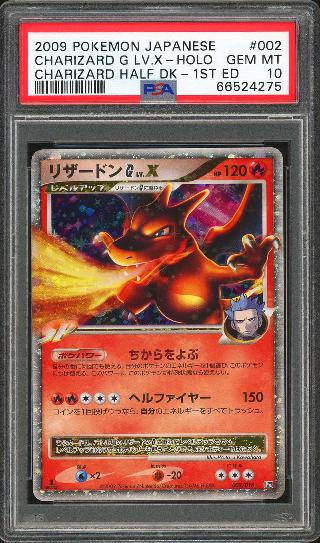
Graded card example

Charizard G LV.X

Charizard G LV.X · PSA · 10 · Cert: 66524275

From real-world capture to business data.

One recognition endpoint for Raw (ungraded) and graded cards. Get card details and grading labels according to card type.

One photo. Multiple cards.

Start with photos, scans, or batch capture.

Photo recognition

Upload phone photos or scans to identify physical cards. No standard product image needed.

Multi-card detection

Detect multiple cards in one image and return each separately for batch entry.

Read the card and its label.

Keep the details beyond card identity.

Certification & label text

Extract certification numbers and label text for search, checks, and graded-card records.

View graded-card fields

Print-language detection

Detect the printed language and include it in results to distinguish language editions.

Results with room for review.

Your business decides what happens next.

Confidence score

Use confidence scores to set rules for auto-entry, human review, or retakes.

Candidate variants

Return candidate variants for comparison and confirmation, reducing corrections from selecting the wrong edition.

One card. Distinct identity fields.

Use card details to link the catalog; keep grading labels as separate fields for inventory and trading.

Raw (ungraded) cards: identify the card.

Match photos to a card, set, number, language, and candidate variants. Return separate results for each card in multi-card images.

Card identity
Card ID · Name · Set · Number
Variant details
Print language · Candidate variants
Match review
Confidence · Review flags

Graded cards: include the label.

Identify slabbed cards and read company, existing grade, certification number, and label text. Store identity and grading fields separately for verification and linking.

Grading attributes
Company · Label grade
Certification details
Certification number · Label text
Business mapping
Graded inventory · Market filters · Population queries

Capture in your app. Recognize through our API.

Keep your familiar flow. Add card data.

01

Photograph or scan

Users capture cards with a phone, camera, or scanner.

02

Upload image

Your app sends an image to the Card Recognition API.

03

Receive & process

Parse each card, language, and variant. Keep graded-card company, grade, and certification fields when filling your records.

Try in Playground

Explore request parameters and responses.

Built for your next product.

01

Create listings

Upload a card photo, use results to fill the name, set, and variant, then confirm the listing.

Explore solution
02

Inventory entry

Capture Raw (ungraded) and graded cards in one flow. Create per-card inventory records with company, grade, and certification fields for graded cards.

Explore solution
03

Collection entry

Users photograph or scan cards, confirm matches, and save them to their collection.

Explore solution

Before you integrate.

More questions? Contact us

Do Raw (ungraded) and graded cards need separate integrations?

Use one upload endpoint for both card types. Graded cards return extra label fields. Leave unreadable fields empty for business-side review.

Do I need standard card images?

No standard image is required. Users photograph or scan their cards, your app uploads the image, and the API returns recognition data.

How are multiple cards in one photo returned?

Multi-card detection returns each card separately. Show a review list before creating listings, inventory entries, or collection records.

How should confidence and multiple variants be handled?

Set review rules by confidence. Show variant differences when several candidates match. Confidence supports decisions; it does not guarantee accuracy.

What are certification numbers and label text used for?

Use these fields for search, verification, and records. Recognition reads existing labels; it does not authenticate certificates or regrade cards. For raw condition, see Pre-grading.

Can I query prices and Population after recognition?

Use the returned card ID to query Card Pricing Data or Population Data. Recognition and data queries are separate steps you can combine as needed.

Tell us about
card business.

Connect an API, request a key or discuss your data needs.
Tell us what you are building. Let us find the next step.

  • Start with your use case

    Define product goals, data scope, and API needs.

  • Find the right integration

    Combine recognition, imaging and data.

  • Discuss trial access

    Once the plan is agreed, we help you get an API key.

Services of interestSelect any

By submitting, you agree we may contact you about this inquiry.

Request submission is not connected in this preview.

One card. Your first API call.

Try preset requests and responses in Playground, or contact us for an API key.